 Slim Chatwork
ショートコード
選択中のテキストや現在日時を、テンプレートから自動挿入。定型文を状況に合わせて変化させる機能です。
ショートコードは、メッセージテンプレート登録で利用できる特別な記法です。テンプレートを呼び出したときに、選択中のテキストや現在日時などへ自動的に置き換えます。
ショートコードを挿入する
Section titled “ショートコードを挿入する”1. テンプレートの編集フォームを開く
Section titled “1. テンプレートの編集フォームを開く”Slim Chatworkのポップアップ設定画面から「メッセージテンプレート登録」を開き、ショートコードを追加したいテンプレートの編集フォームを展開します。
2. メッセージ欄を選択する
Section titled “2. メッセージ欄を選択する”メッセージ欄にフォーカスすると、「ショートコード」ボタンを選択できるようになります。既に内容が記載されている場合はショートコードを挿入したい位置にカーソルを移動します。
3. ショートコードを選ぶ
Section titled “3. ショートコードを選ぶ”「ショートコード」ボタンをクリックし、「📅 日付関連」「✏️ エディタ関連」「🕐 時間関連」から目的の項目を選びます。選択したショートコードは、メッセージ欄のカーソル位置に挿入されます。
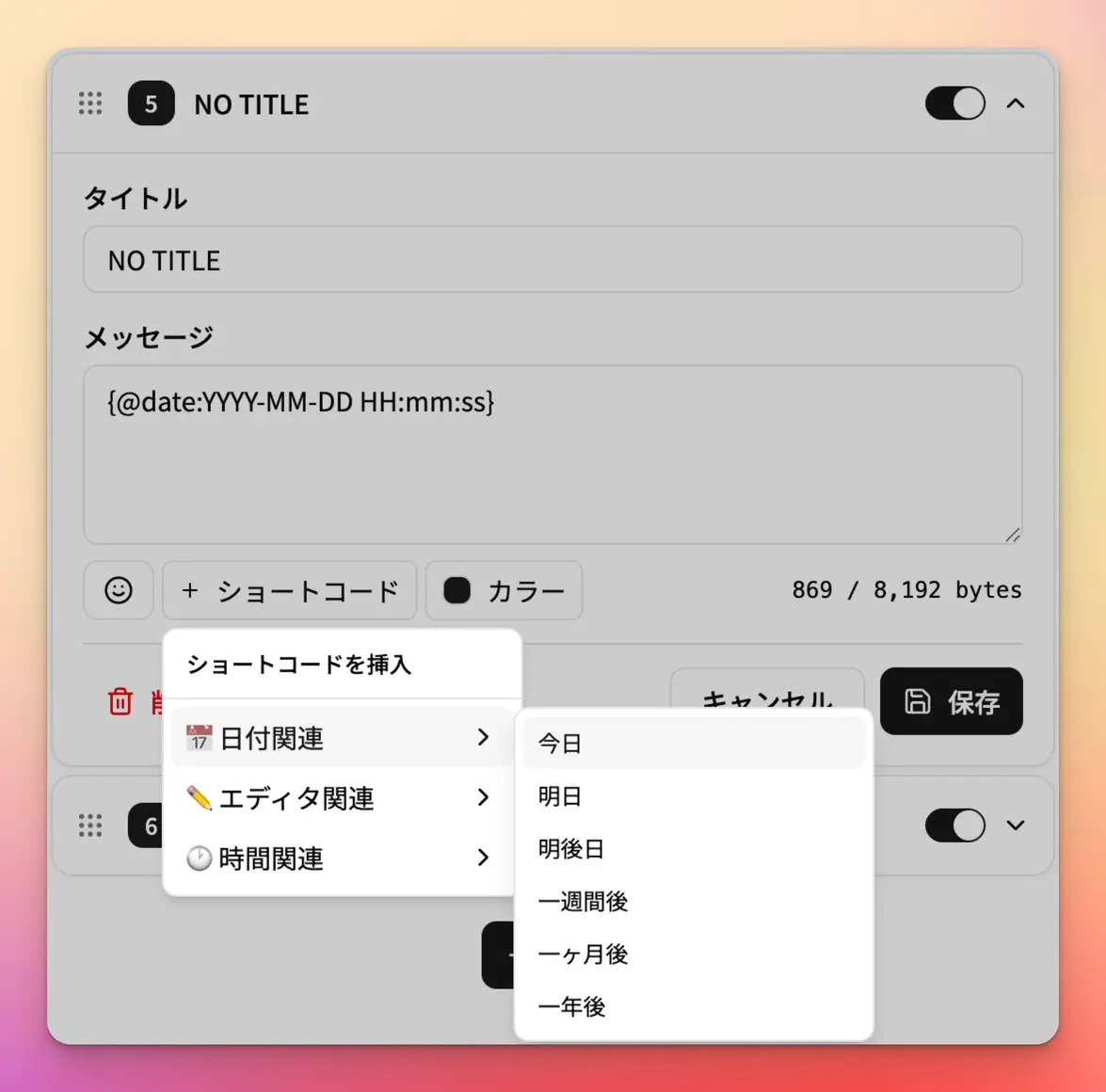
日付の表示形式やカウントダウンの対象日時など、ショートコード内の値を用途に合わせて編集し、テンプレートを保存します。
ショートコード早見表
Section titled “ショートコード早見表”| 構文 | 挿入する内容 | 詳細 |
|---|---|---|
{@selected:} | メッセージ入力欄で選択しているテキスト | 選択テキストを挿入する |
{@cursor:} | テンプレート挿入後のカーソル位置 | カーソル位置を指定する |
{@time:format} | テンプレートを呼び出した時点の日時 | 現在の日時を挿入する |
{@date:format,加算値,unit} | 現在を基準とする未来・過去の日時 | 未来・過去の日時を挿入する |
{@timecountdown:日時,format} | 指定日時までの残り時間 | 指定日時までの残り時間を挿入する |
選択テキストを挿入する
Section titled “選択テキストを挿入する”{@selected:}を使うと、Chatworkのメッセージ入力欄で選択しているテキストを、テンプレート内の指定した位置に挿入できます。
{@selected:}Chatworkの装飾タグと組み合わせると、選択中のテキストを簡単に装飾できます。
選択テキストを枠で囲む
Section titled “選択テキストを枠で囲む”[info]{@selected:}[/info]選択テキストをタイトル付きの枠で囲む
Section titled “選択テキストをタイトル付きの枠で囲む”[info][title][/title]{@selected:}[/info]選択テキストをコードとして囲む
Section titled “選択テキストをコードとして囲む”[code]{@selected:}[/code]選択テキストをタイトル付きの枠とコードで囲む
Section titled “選択テキストをタイトル付きの枠とコードで囲む”[info][title][/title][code]{@selected:}[/code][/info]カーソル位置を指定する
Section titled “カーソル位置を指定する”{@cursor:}を使うと、テンプレートを挿入した後のカーソル位置を指定できます。定型文を挿入した直後に、続けて入力してほしい位置がある場合に便利です。
{@cursor:}枠のタイトル部分へカーソルを移動する
Section titled “枠のタイトル部分へカーソルを移動する”[info][title]{@cursor:}[/title]{@selected:}[/info]選択テキストの先頭へカーソルを移動する
Section titled “選択テキストの先頭へカーソルを移動する”[info]{@cursor:}{@selected:}[/info]選択テキストの末尾へカーソルを移動する
Section titled “選択テキストの末尾へカーソルを移動する”[info]{@selected:}{@cursor:}[/info]現在の日時を挿入する
Section titled “現在の日時を挿入する”{@time:format}を使うと、テンプレートを呼び出した時点の日時を、指定した書式で挿入できます。
{@time:format}本日は{@time:YYYY年MM月DD日}です。現在の時刻は{@time:HH:mm:ss}です。曜日は{@time:dddd}です。未来・過去の日時を挿入する
Section titled “未来・過去の日時を挿入する”{@date:}を使うと、テンプレートを呼び出した時点を基準に、未来または過去の日時を挿入できます。
{@date:format,加算値,unit}format、加算値、unitは省略できます。すべて省略した{@date:}は、現在の日付をYYYY/MM/DD形式で挿入します。
今日 :{@date:}明日 :{@date:YYYY-MM-DD,1,d}一週間後:{@date:YYYY-MM-DD,1,w}1か月後 :{@date:YYYY-MM-DD,1,M}昨日 :{@date:YYYY-MM-DD,-1,d}加算値に負数を指定すると、過去の日時を挿入できます。加算値には整数を指定してください。
指定できるunit
Section titled “指定できるunit”| 単位 | 指定値 | 使用例 |
|---|---|---|
| 日 | d | {@date:YYYY-MM-DD,1,d} |
| 週 | w | {@date:YYYY-MM-DD,1,w} |
| 月 | M | {@date:YYYY-MM-DD,1,M} |
| 年 | y | {@date:YYYY-MM-DD,1,y} |
| 時 | h | {@date:HH:mm,2,h} |
| 分 | m | {@date:HH:mm,30,m} |
| 秒 | s | {@date:HH:mm:ss,30,s} |
日付・時刻の表示形式
Section titled “日付・時刻の表示形式”formatには、次のような書式を組み合わせて指定できます。日時処理にはDay.jsを使用しています。
| format | 表示内容 | 出力例 |
|---|---|---|
YYYY | 4桁の年 | 2026 |
YY | 2桁の年 | 26 |
M / MM | 月 | 7 / 07 |
D / DD | 日 | 20 / 20 |
ddd / dddd | 曜日 | 日 / 日曜日 |
H / HH | 24時間表記の時 | 9 / 09 |
h / hh | 12時間表記の時 | 9 / 09 |
m / mm | 分 | 5 / 05 |
s / ss | 秒 | 8 / 08 |
A / a | 午前・午後 | AM / am |
指定日時までの残り時間を挿入する
Section titled “指定日時までの残り時間を挿入する”{@timecountdown:}を使うと、指定した未来の日時までの残り時間を、年・日・時間のいずれかで挿入できます。締切やイベントまでの「あと何日」を自動計算する場合に便利です。
{@timecountdown:日時,format}時刻まで指定する場合は、2030-01-01T18:00のように、日付と時刻をTでつないで記述します。
指定できるformat
Section titled “指定できるformat”| 単位 | format |
|---|---|
| 年 | y |
| 日 | d |
| 時間 | h |
リリースまであと {@timecountdown:2030-01-01,d} 日です。締切まで残り {@timecountdown:2030-01-01T18:00,h} 時間です。ショートコードを組み合わせたテンプレート集
Section titled “ショートコードを組み合わせたテンプレート集”そのままコピー&ペーストして利用できるテンプレートを紹介します。
タイトル付きの枠+現在の日付+本文へカーソルを移動
[info][title]{@time:YYYY年MM月DD日(dddd)}[/title]{@cursor:}[/info]タイトル付きの枠+タイトルへカーソルを移動+選択テキストをコードで囲む
[info][title]{@cursor:}[/title][code]{@selected:}[/code][/info]フィードバック
Section titled “フィードバック”- バグ報告はお問い合わせフォームからお送りください。
- 拡張機能への評価はChromeウェブストアから投稿できます。
- ショートコードに関するご意見・ご提案は(@_cofus)までお寄せください。